 Nov 13, 2018
  VAT
VAT
Changing email id used in VAT registration
Changing email id used in VAT registration
An Online user can change their account email address, where necessary. The process is divided into the below steps:- Verifying the new email
- Submitting the email change request to the FTA
- Verify your new email
- Log in to the eServices portal, and click on ” My Account”
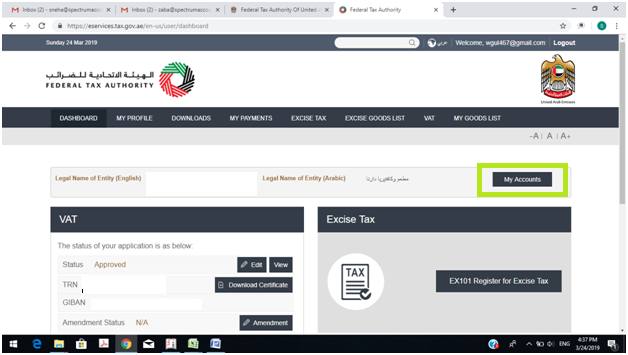
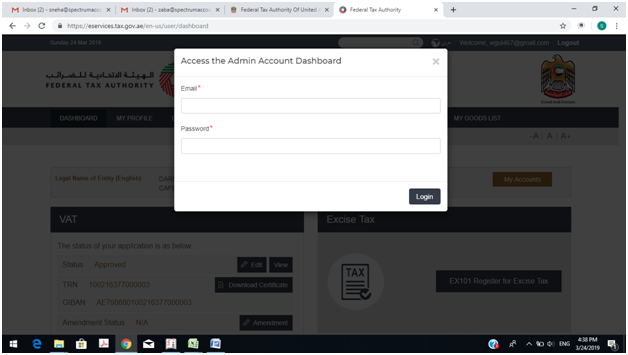
- It will ask for the password again and put your password
- Then go to MY PROFILE”
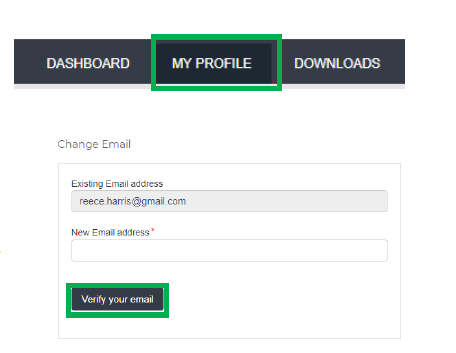
- At the bottom left of the screen, you will see the option to add a new email address. Add a new email address and click on “Verify your email”
- You will receive an email link in the newly added email address asking you to verify your email address.
- Verify the email by clicking on the “Click here to verify your new email” link in the body of the email that you have received.
- Submit the email address change request to the FTA
- Log into the eServices portal (using your old email address) and go to the ‘My Profile’ tab.
- Upload the supporting document(s) that will help the FTA review and approve your request for the change of email address and click on the “Submit for Approval” button.
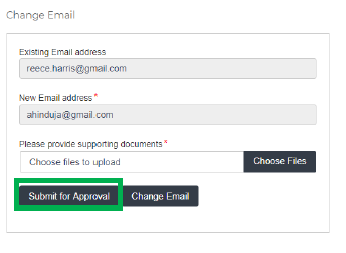
| Supporting documents would be: · Signed and stamped Letter from Authorized Signatory of the company requesting the email change request and providing the details (name, email address, passport number etc.) of the old and new email holder. This letter must be on official companyheaded paper, include a company stamp and business contact details of the company. · Copy of passport of the old and new email holder · Copy of Emirates ID of the old and new email holder (if applicable) |
- Once the request is submitted, a confirmation message will be displayed